
Annual Enrollment Period
How to Review Your Prescription Drug Plan
Follow the steps below to enter your medications, review options and find the Part D plan that best fits your needs.
Table of Contents

Before You Get Started
The standalone Part D shopping process has changed for 2027. Changes across the Part D market have limited how insurance agents are able to assist with standalone Part D plans.
As a result, most clients will review and enroll in their Part D plan through Medicare.gov using the resources below.
HTA is not offering routine Part D AEP review appointments like in prior years, so please complete the steps on this page before contacting HTA for Part D support.
Important 2027 Part D Plan Changes
Some Part D plans are seeing major changes for 2027, including plan terminations, automatic moves to new plans, and significant premium changes.
Watch this short video before deciding whether to keep or change your plan.

Information to Gather
Before you begin, have these items nearby:
-
- Your Medicare Card (You’ll need your Medicare Number and start date)
- Your current Prescription Bottles
- Name(s) of your Preferred Pharmacies
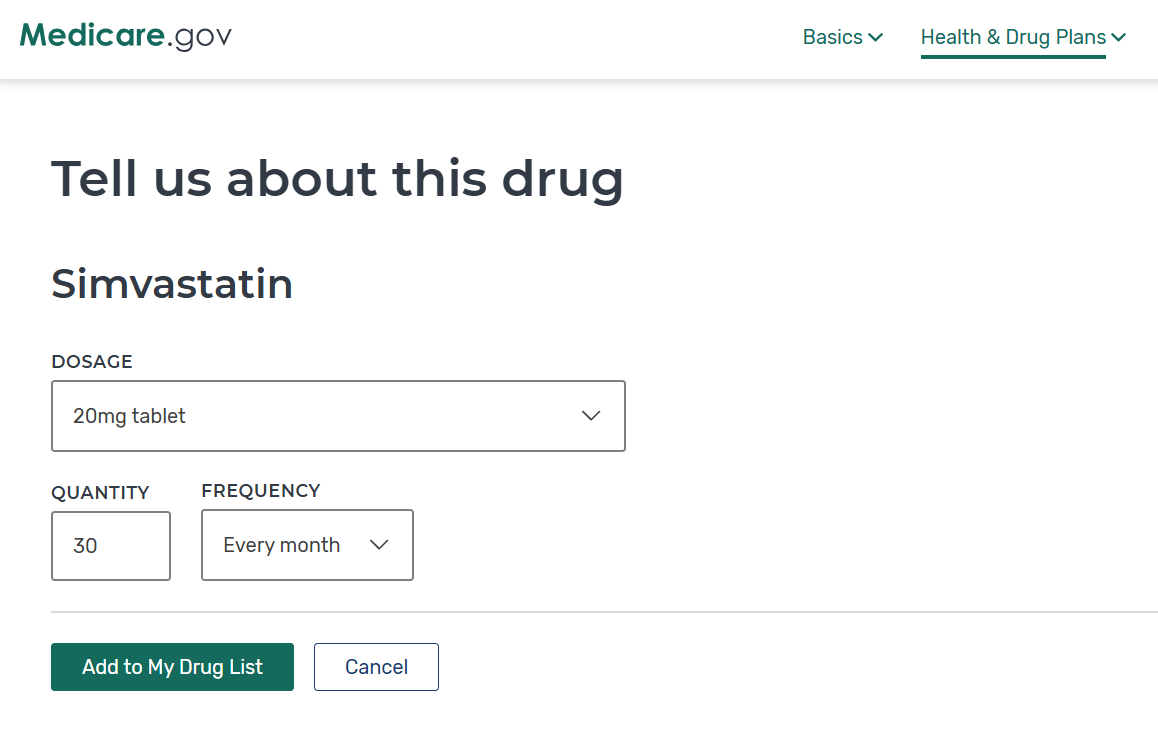
Tip: Using the exact medication name and dosage helps Medicare.gov estimate the most accurate costs.
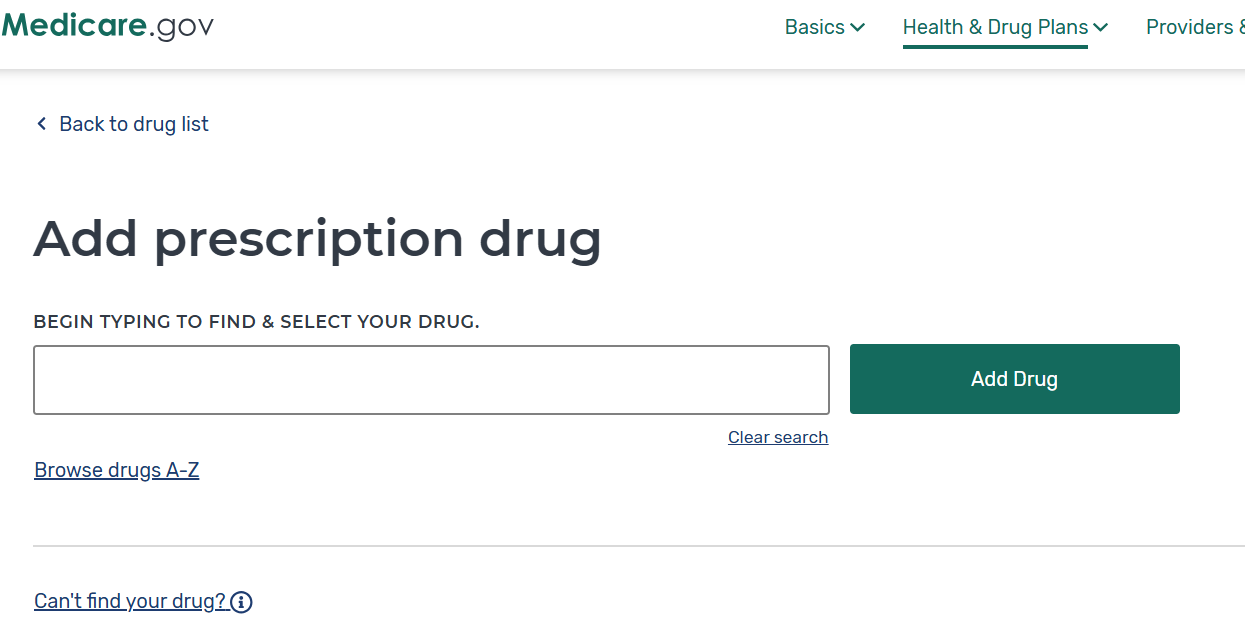
Step 1: Log In & Enter Your Medications
Before comparing plans, make sure your Medicare.gov account is ready and your information is current.
- Log in to your Medicare.gov account
- Don’t have an account? Create one
- Enter each medication exactly as it appears on your prescription bottle
- Confirm or update your preferred pharmacy
Important Tip:
Step 2: Compare Your Part D Options
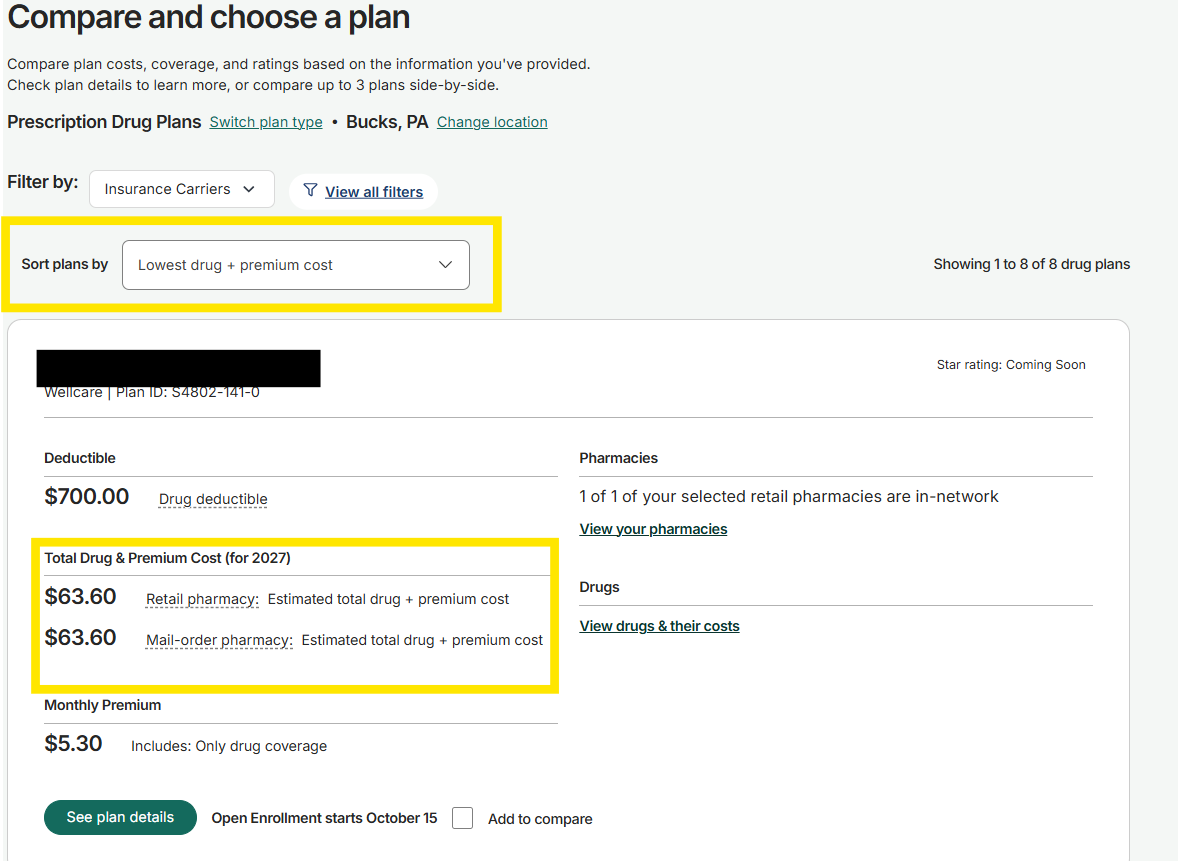
Once your medications and pharmacy are entered, Medicare.gov will show the available Part D plans.
When comparing plans, review:
- Total Drug & Premium Cost
- Monthly Premium & Deductible
- Drug coverage, Prescription copays, or coinsurance
- Preferred pharmacy
Important Tip: Do not choose a plan based on monthly premium alone.
Step 3: Review & Decide
Keeping Your Current Plan?
No action is needed.
If your current plan is still a good fit for 2027 and is continuing next year, it will renew automatically.
Changing Plans?
Enroll through Medicare.gov between October 15 and December 7.
Once your new enrollment is submitted, your new coverage will begin January 1, and your current plan will end automatically.
No separate cancellation is needed.
Have Questions About a Plan?
If you are able to use Medicare.gov but have questions about a specific Part D plan:
- Check the FAQs below for common Part D questions
- If you are keeping your current plan, contact your current insurance company
- If you are considering a new plan, contact that insurance company directly
- The plan can explain how the coverage works, including prescription coverage, copays, pharmacy networks, prior authorization, and other plan rules
- If you would like help comparing your Part D options, you can also call 1-800-MEDICARE
Still Need Help?
Please start with the steps and resources above.
If you are unable to navigate Medicare.gov, please call HTA at 610.430.6650. We will have limited Part D support available for clients who need additional assistance.
Medicare Supplement Reminder
Medicare Supplement plans are not part of AEP.
You do not need to review or change your Medicare Supplement plan just because AEP is happening.
HTA will continue to help you review your Medicare Supplement coverage around your policy renewal.
We’ll send you a reminder 30 days before your renewal so you can decide whether a review makes sense.
If you received a rate increase or are approaching your policy renewal, learn when it may make sense to review your Medicare Supplement coverage.